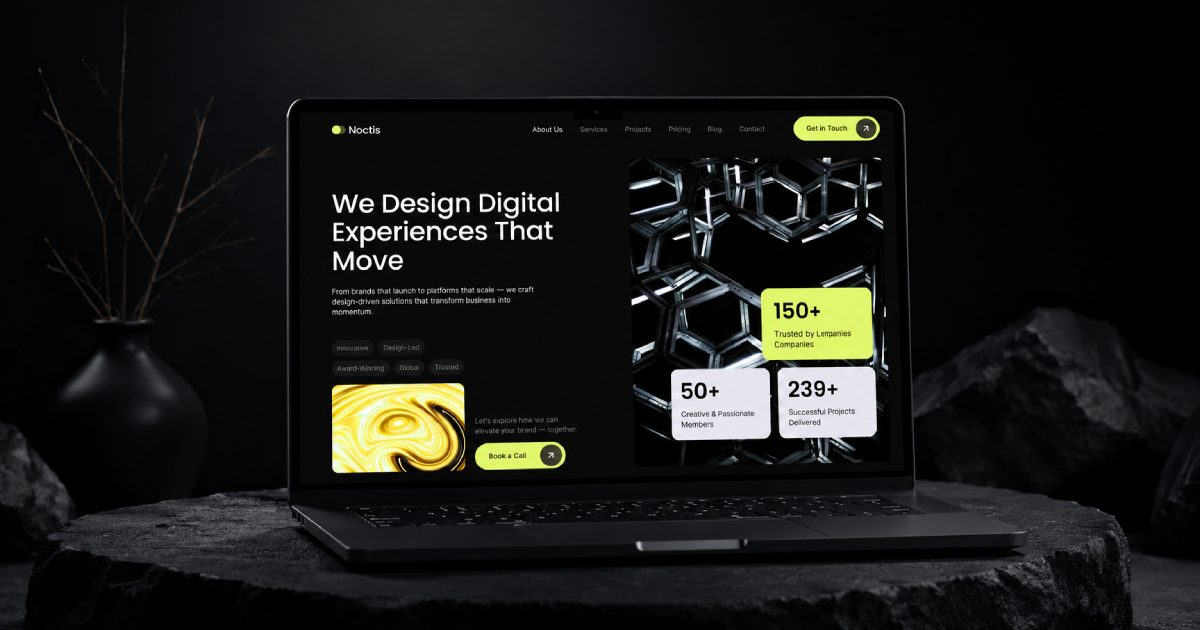
Built for modern Webflow creators

How I Built Noctis - A Premium Webflow Template for Digital Agencies

Explore how I built Noctis, a premium Webflow template for digital agencies with a minimalist design, CMS, responsive layouts, and Client-First structure.
9
min read
How I Built Noctis - A Premium Webflow Template for Digital Agencies

Key Takeaways

  • Noctis is a premium Webflow template for digital agencies, built after analyzing 90+ templates in the Portfolio & Agency category on Webflow Marketplace.
  • Only 10 of the 90 analyzed templates had a well-structured CMS, and only 3 included a complete set of features for a detailed agency website.
  • Built fully with the Finsweet Client-First 2.1 methodology, with consistent class naming and heading hierarchy across every page.
  • Includes 3 Home Page versions, 3 CMS Collections (Services, Projects, Blog Posts), and 5 technical pages (404, Password Protected, Style Guide, License, Changelog).
  • Services CMS Collection includes 3 layout versions and 13 fields, including separate SEO Title, Meta Description, and H1.
  • Projects CMS Collection supports up to 3 images per project, plus Client, Timeline, Budget, Industry, and Website fields.
  • Each project and each blog category can include its own FAQ block with 6 questions and 6 answers.
  • Blog Categories CMS includes dedicated SEO Title, Meta Description, H1, and Open Graph Image fields per category.
  • Design system is controlled through 5 core Webflow Variables (colors, typography, border radius, spacing, gaps) across 6 responsive breakpoints.
  • The listed price is $129, with a checkout discount bringing it to $79.

Researching Webflow Agency Templates and Identifying the Main Gaps

We analyzed more than 90 Webflow templates listed in the Portfolio & Agency Website Templates category on Webflow Marketplace.

Only 10 of them had a well-structured CMS system and were built using the Finsweet Client-First 2.1 methodology. Only 3 templates included a complete set of features and content elements needed for a detailed agency website.

Among the templates we analyzed:

  • 75 templates were limited to only one CMS collection for projects.
  • 57 templates did not have a complete CMS structure for their services.
  • Many templates had limited fields for displaying tags, skills, descriptions, and other service information.

We found that this makes it harder to create a detailed agency website and properly present all of the services, projects, and expertise of a digital agency.

Based on this research, we decided to create Noctis, a premium Webflow template designed for digital agencies, startups, and portfolio websites.

Our goal was to create a template that offers more flexibility through its sections, CMS collections, and content structure.

We designed every page, planned the structure of each section, created the required CMS collections, and developed a complete Webflow template that is now available on Webflow Marketplace.

Noctis includes:

  • 3 Home Page versions
  • 3 CMS collections: Services, Projects, and Blog Posts
  • About Us
  • Services
  • Projects
  • Blog
  • Contact
  • 5 technical pages: 404 Error Page, Password Protected, Style Guide, License, and Changelog

The main idea was to provide a wide range of useful sections for presenting an agency's services, portfolio, projects, experience, and capabilities.

Because only 3 of the 90 analyzed templates had a more complete set of features for presenting agency content, we designed Noctis to provide a stronger foundation for showcasing services, portfolio projects, agency advantages, awards, and expertise.

This gives agencies more flexibility when building a professional website and adapting the template to their own content and business needs.

How Noctis Uses Finsweet Client-First 2.1

Noctis is fully built using the Finsweet Client-First 2.1 methodology.

Each page has its own clear structure and a consistent heading hierarchy. Every section uses clear class names, making it easier to understand which content belongs to each section.
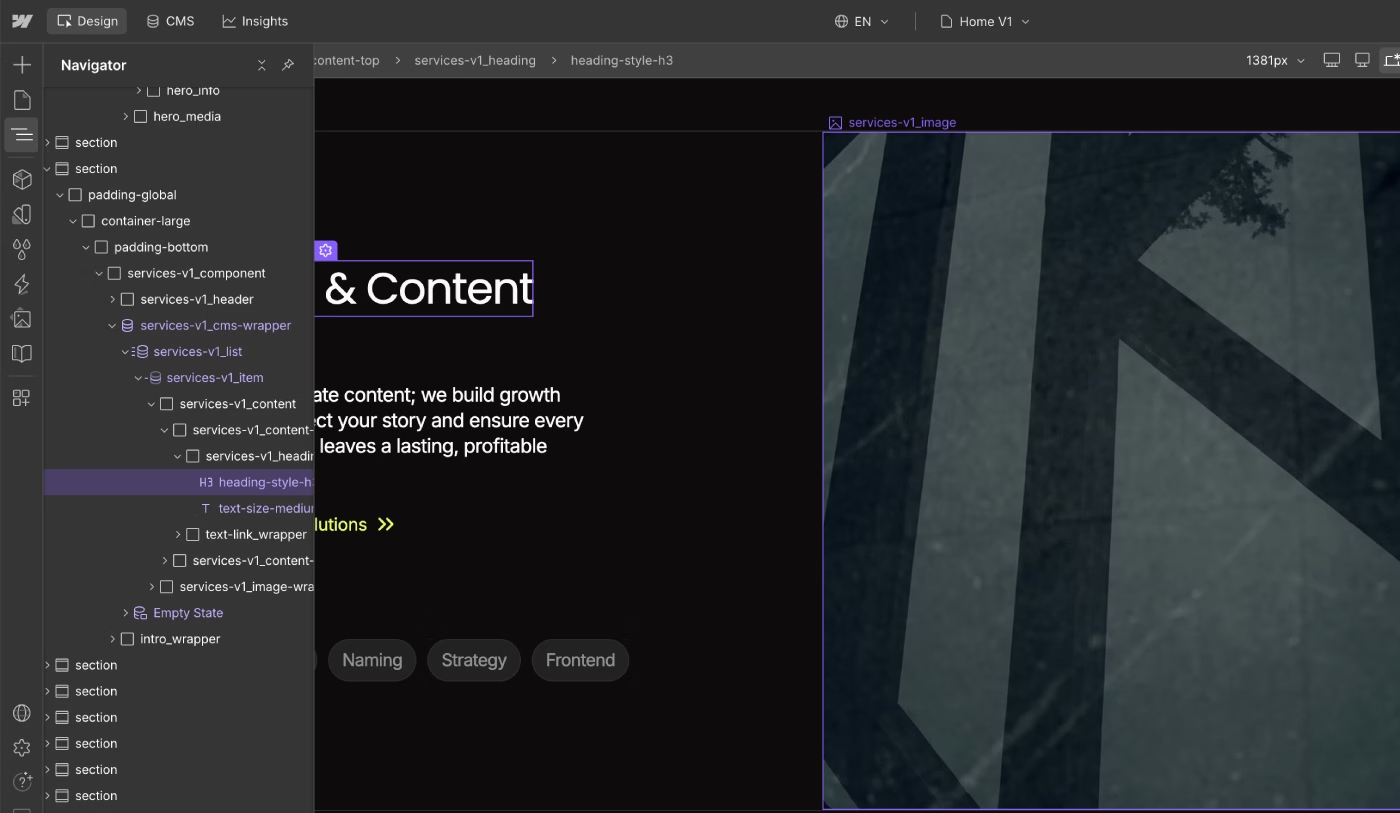
Noctis Webflow template homepage structure with Finsweet Client-First 2.1 classes.
Noctis homepage structure organized with the Finsweet Client-First 2.1 system.

The template is easy to edit and extend. You can create new sections or expand existing ones without rebuilding the entire structure.

Based on our research, this type of structured development system is missing from many Webflow agency templates.

You can learn more about the Finsweet Client-First 2.1 methodology and how we build Webflow websites in our detailed guide.

A Flexible CMS Structure for Webflow Agency Websites

Unlike 87 of the 90 templates we analyzed, Noctis includes complete CMS collections for services and projects.

These collections provide dedicated fields for important content such as tags, skills, descriptions, and project information. The CMS structure can also be edited and expanded without relying on custom code.

The template includes:

  • 3 versions of the Services CMS collection: services-v1_cms, services-v2_cms, services-v3_cms
  • 3 Hero section versions: hero_component, hero-v2_component, hero-v3_component
  • 3 Portfolio section versions: portfolio-v1_component, portfolio-v2_component, portfolio-v3_component
  • 4 reusable Components: Header, Footer, Team, and Testimonials
  • 3 Testimonials section versions: testimonials-v1_component, testimonials-v2_component, testimonials-v3_component
  • 2 FAQ section versions: faq_component, faq-v2_component
  • 30+ additional content sections

We created 2 or 3 versions of the most important sections so users can test different layouts and choose the version that works best for their content.

This can save time during customization because you do not need to design every section from scratch.

You can also combine 5–7 sections from the template to create your own homepage structure based on the needs of your agency.

Webflow Variables for Faster Template Customization

Noctis includes 5 main Webflow Variables that make it easier to customize the design system from one place.

These Variables control:

  • Colors
  • Typography
  • Border radius
  • Margin and padding
  • Gaps

This makes it easier to adapt the Webflow template to an existing brand identity.
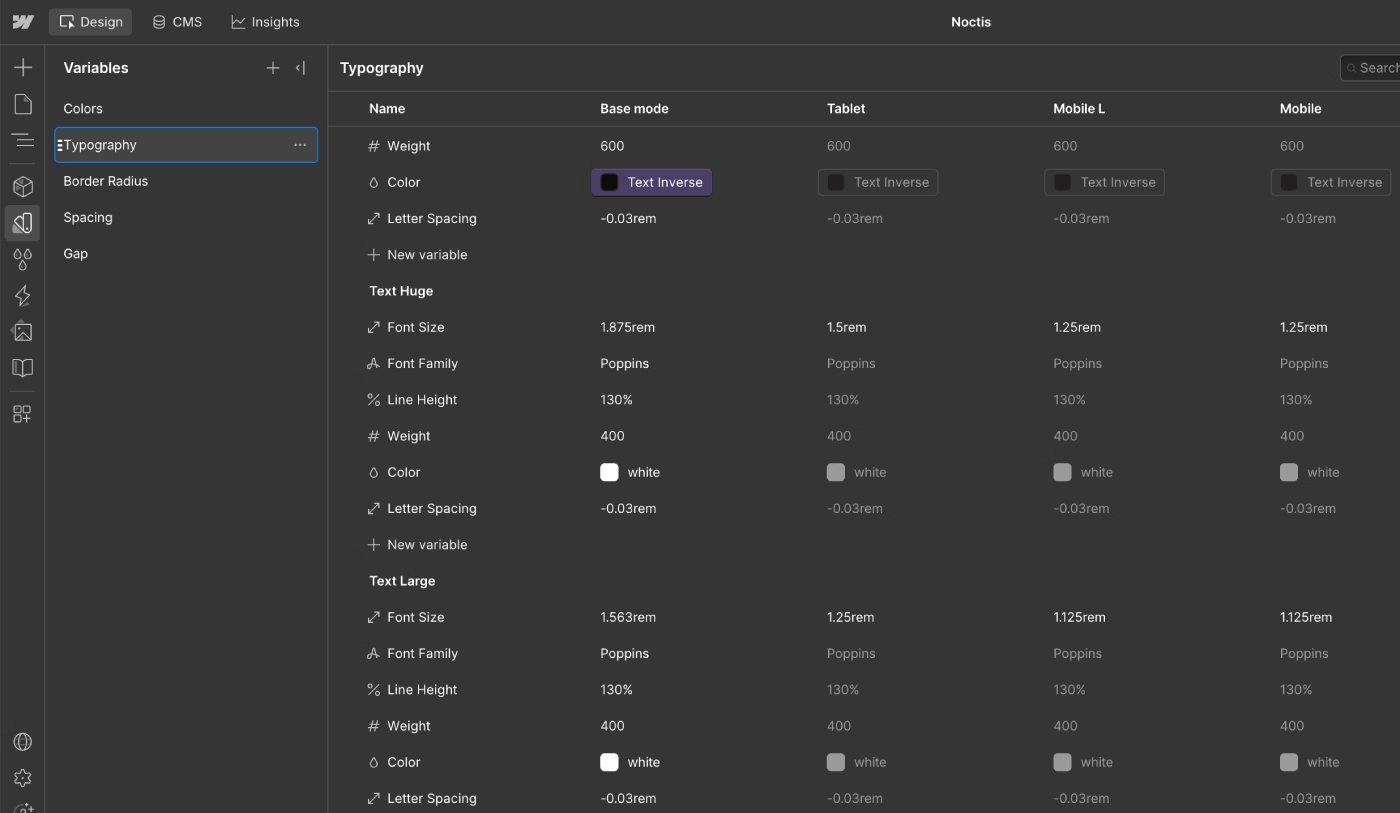
Noctis Webflow template typography Variables for global text styling
Typography Variables used to manage global text styles in the Noctis Webflow template.

Typography has its own settings for different breakpoints:

  • 1920px
  • 1440px
  • Base
  • Tablet
  • Mobile L
  • Mobile

You can customize the following properties for H1–H6 headings and body text:

  • Font Size
  • Font Family
  • Line Height
  • Font Weight
  • Color

For example, you can change the padding from 3rem at the 1440px breakpoint while keeping a different value at another breakpoint.

This level of control makes it easier to experiment with typography and responsive layouts without manually editing every section.

We also use different border-radius Variables:

  • Radius Small
  • Radius Medium
  • Radius Large
For example, you can change Radius Medium from 2.5rem to 1rem and update the appearance of multiple elements across the website.

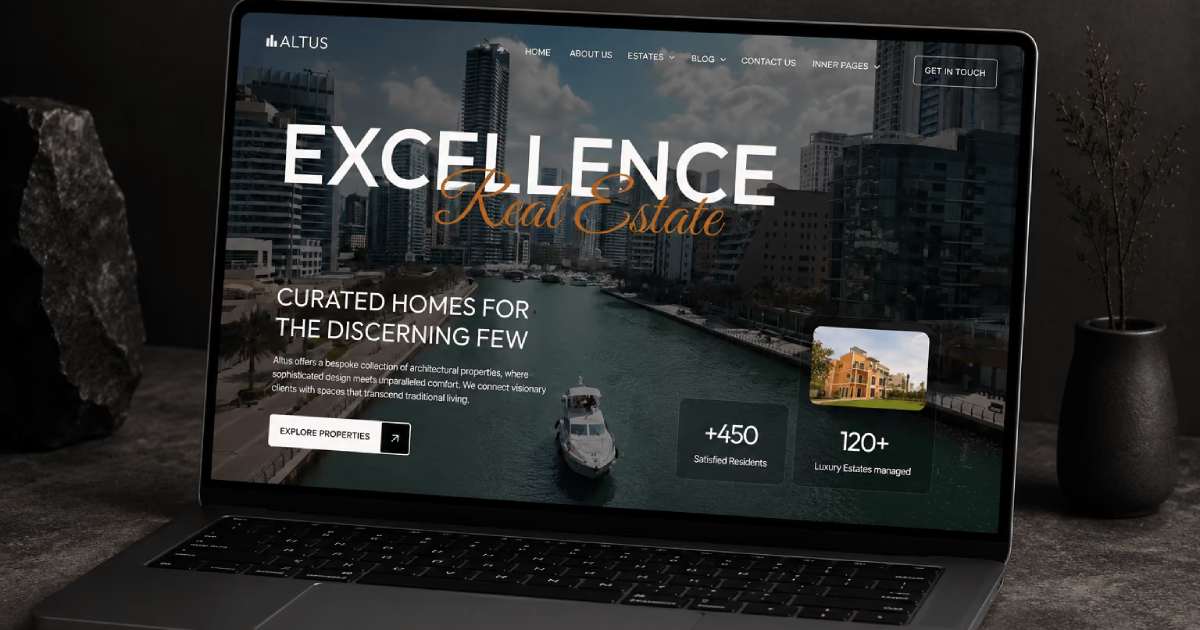
I explained why we use a complete Variables system and how it helps with website scalability in this case study: How I Built Altuss — A Luxury Real Estate Webflow Template.

Designing a Clear Services Section for Digital Agencies

We analyzed 30 Webflow Marketplace templates with different approaches to Services sections. Most of them had good visual presentation, but 25 focused heavily on animations for content and images.

In some cases, the animations made the content harder to read and edit. This was especially noticeable on mobile devices.

For Noctis, we decided to prioritize content readability and customization.

Instead of using heavy animations, we use simple hover interactions where they add value without distracting from the content.
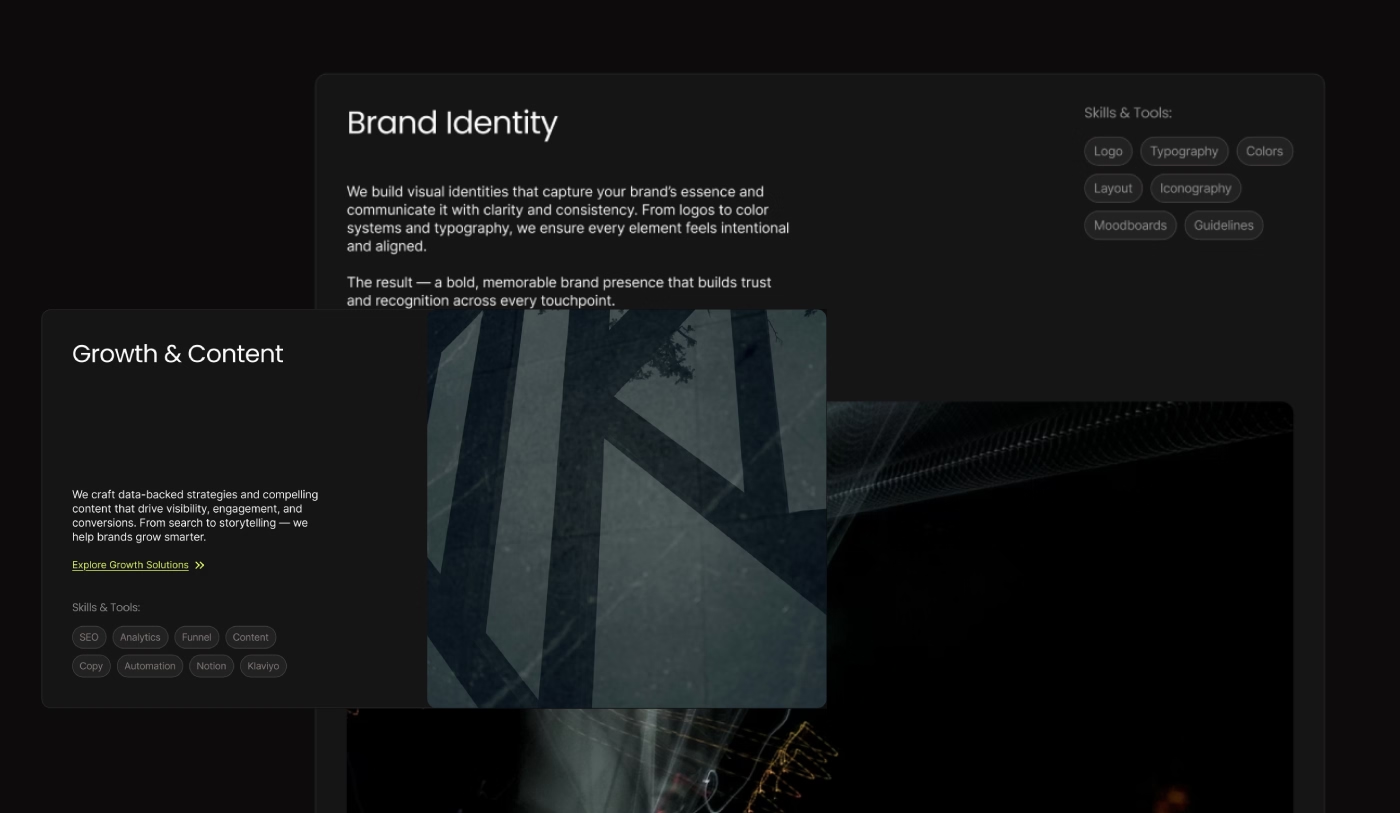
Two responsive Services section layouts for a digital agency Webflow template.
Two Services section layouts included in the Noctis Webflow template.

All three Services layouts are designed to display the most important information clearly:

  • Title
  • Description
  • Button
  • Skills
  • Images

The layouts support different numbers of images:

  • Version 1 supports 1 image.
  • Version 2 supports 3 images.
  • Version 3 supports 1 image.
  • All versions are designed to keep the content readable across different screen sizes.

You can choose the layout that best fits your content and test different versions before launching the website.

The Services CMS collection includes 13 fields:

  • Title
  • Description
  • Heading H1
  • Summary Text
  • Gallery Image Left
  • Gallery Image Right
  • Main Content
  • Main Wide Image
  • Intro Label
  • Intro Description
  • Link Text for Card
  • Service Skill
  • Service Images

All of this information can be managed from the CMS and displayed dynamically on individual service pages.

For better Webflow SEO, we also created separate CMS fields for the page Title and Meta Description.

This allows you to use a different SEO Title, Meta Description, and H1 instead of repeating the same text across the page.

A Detailed Projects CMS for Digital Agency Portfolios

We analyzed 20 Webflow Marketplace templates with different approaches to Projects and Portfolio sections.

Most of them used very similar layouts. For Noctis, we wanted to create a more flexible structure that could display more information about each project.

Each project can include up to 3 images and additional content for a detailed case study. We also added the option to include up to 6 FAQ questions and 6 answers for each project.

Each project FAQ section can also have its own H2 heading and description.
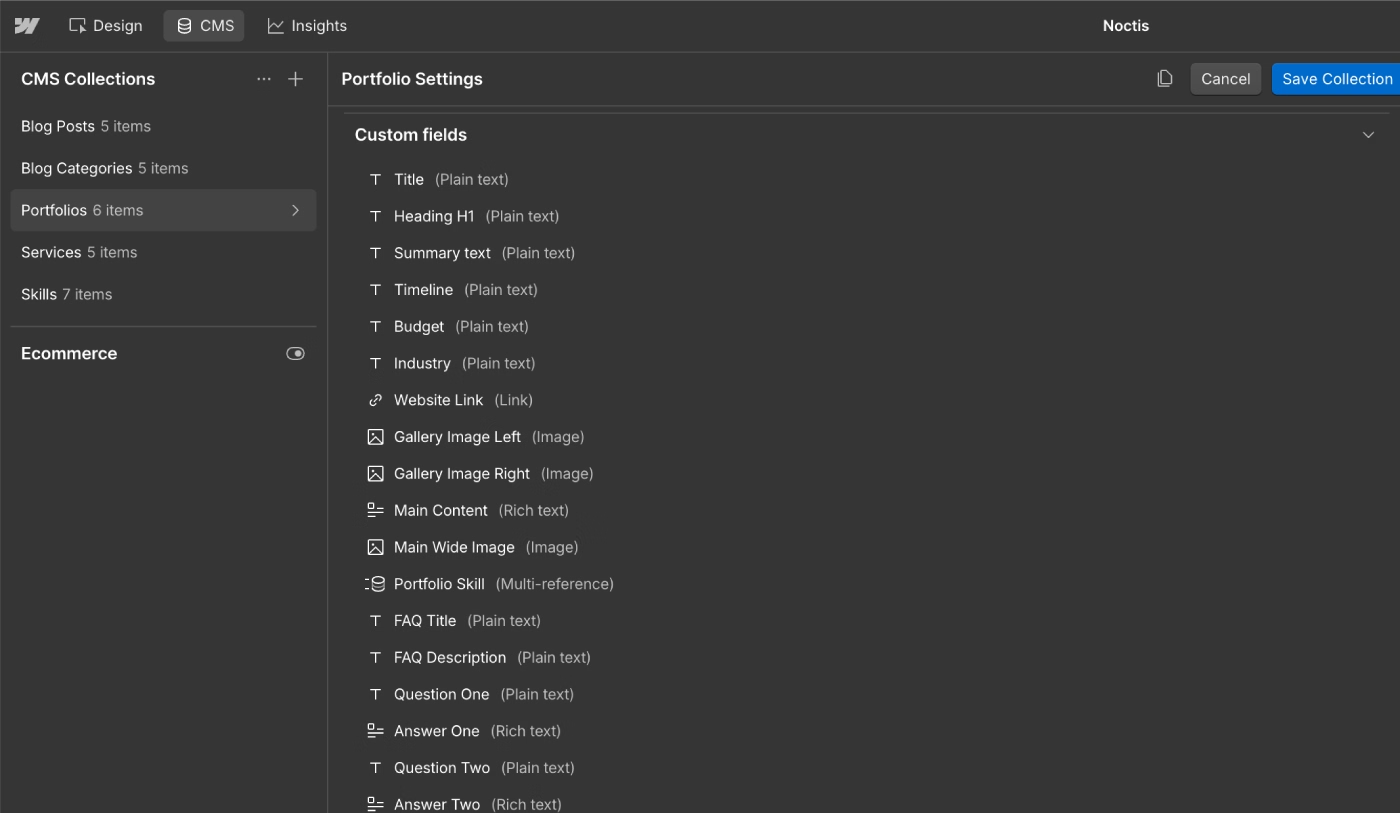
Noctis Webflow Projects CMS collection with structured portfolio fields.
CMS fields used to structure portfolio projects in the Noctis Webflow template.

This Projects CMS structure is designed for detailed project descriptions, SEO optimization, structured content, and better content discoverability.

Each project can also include:

  • Client
  • Timeline
  • Budget
  • Industry
  • Website

This makes it possible to create detailed project pages that clearly explain the work, client, industry, timeline, and other important project information.

Blog Categories for a Scalable Webflow Content Structure

Noctis includes a dedicated Blog Posts CMS collection for publishing articles, case studies, project updates, and company news.

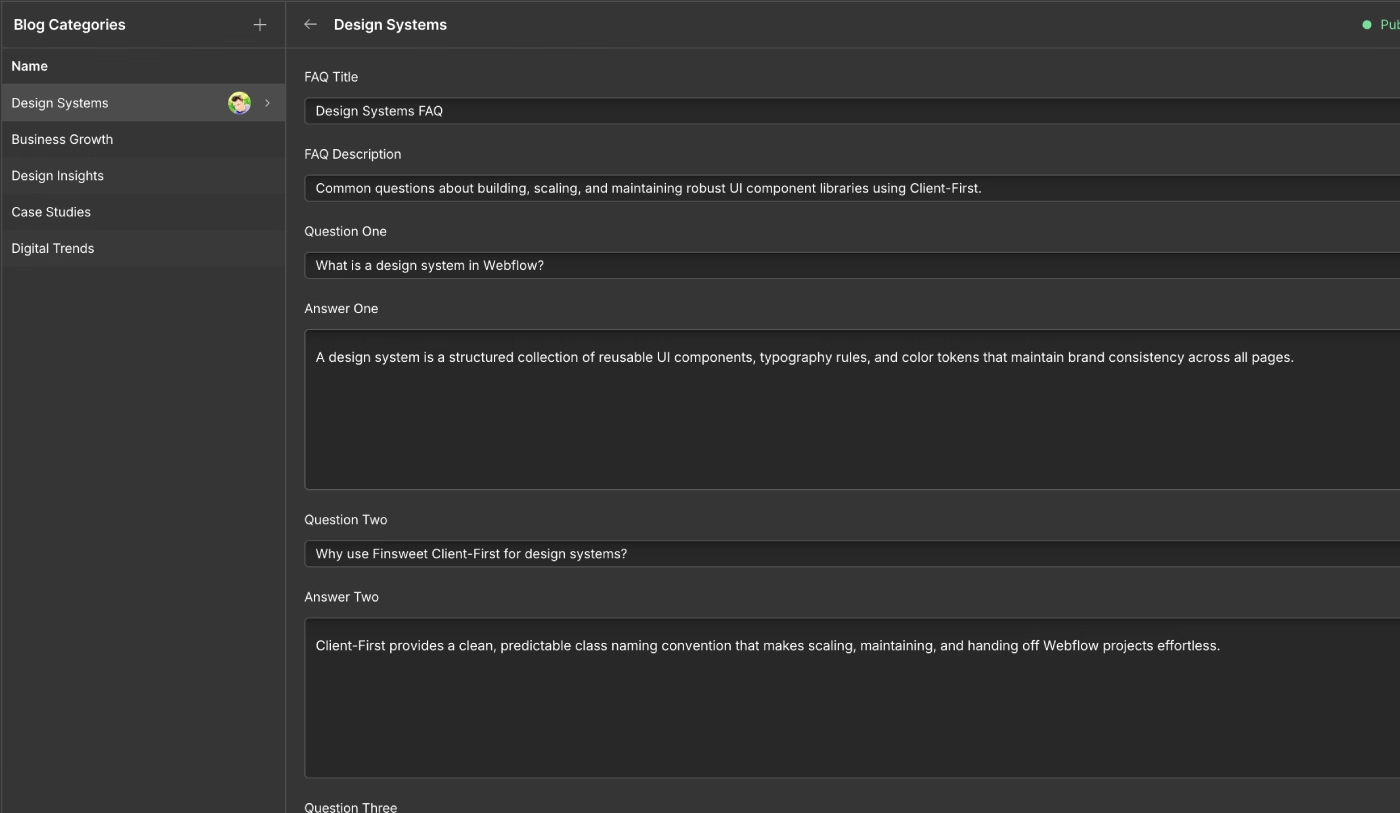
We also created a separate Blog Categories CMS collection to organize content into different topics.

Each category has its own dynamic page where related blog posts are displayed.

For every category, you can manage:

  • SEO Title
  • Meta Description
  • H1
  • Open Graph Image
  • 6 FAQ Questions
  • 6 FAQ Answers
Noctis Webflow Blog Categories CMS collection with SEO and FAQ fields.
Blog Categories CMS collection with SEO and content fields.

This structure makes it easier to organize content into topic clusters and create dedicated landing pages for different subjects.

It also provides a scalable structure for future SEO growth:

  • Content organized into topic clusters
  • Individual SEO settings for each category
  • Dedicated pages targeting specific search topics
  • FAQ content on category pages
  • Rich Text fields for structured answers, lists, quotes, links, and text formatting
This type of content structure creates a stronger technical foundation for SEO and AI content discoverability.

The Final Noctis Webflow Template Structure

Based on our research, we created Noctis — a premium Webflow template for digital agencies with a flexible structure for future customization, content management, SEO, and website growth.

The template combines:

  • Finsweet Client-First 2.1
  • Flexible Webflow CMS Collections
  • Multiple layout options
  • Webflow Variables
  • Reusable Components
  • Responsive layouts
  • Structured project and service pages
  • Blog Categories
  • FAQ sections
  • SEO-ready content fields

The goal was to create more than just a visual Webflow agency template.

Noctis is designed as a flexible foundation for digital agencies, startups, creative teams, and portfolio websites that need a professional website structure they can customize and scale over time.

The listed template price is $129, but a discount is currently applied at checkout, bringing the price to $79.

Noctis vs the Agency Template Market: Based on Our Analysis of 90 Webflow Templates

Feature Webflow Agency Templates (n=90) Noctis
Client-First 2.1 Methodology Only 10 of 90 templates used it Fully built on Client-First 2.1
Complete Agency Feature Set Only 3 of 90 templates had a complete set of features and content elements Purpose-built to close the gaps found in 87 of 90 templates
Projects CMS Structure 75 of 90 templates limited to a single CMS collection for projects Dedicated Projects CMS with Client, Timeline, Budget, Industry, and Website fields
Services CMS Structure 57 of 90 templates had no complete CMS structure for services 3 Services CMS versions with 13 structured fields
Home Page Versions Usually a single fixed layout 3 Home Page versions, sections can be combined
Services Section Approach 25 of 30 analyzed templates prioritized animation over content readability Content-first design with simple, purposeful hover interactions
Blog Categories CMS Not commonly included as a separate Collection Dedicated Blog Categories Collection with SEO & FAQ fields
Webflow Variables Inconsistent or limited variable systems 5 core Variables: Colors, Typography, Border Radius, Spacing, Gaps

About the Author:
Webflow Designer & Developer specializing in premium Webflow templates, scalable CMS architecture, Client-First development, SEO, and AI-ready websites. Every guide is based on real project experience and follows Webflow Marketplace best practices.
Last Updated:
2026-08-31
Best For:
Webflow Developers, Freelancers, Creative Agencies, Digital Agencies, Marketing Teams, Startup Founders

Frequently Asked Questions About Digital Agency Webflow Templates

Find answers to common questions about Digital Agency Webflow Templates, agency websites, portfolio websites, Webflow CMS, customization, SEO, and choosing the right template for your business.

FAQ KEDD Webflow Template

What Should a Digital Agency Look for in a Webflow Template?

Pay attention not only to the design you see on the homepage. A good-looking design does not always mean that the template is easy to edit, update, and customize. Some templates can have complex animations that make it difficult to change the content or use new images.

You should also pay attention to these important points:

  • Template development methodology
  • Clear class naming
  • Page and section structure
  • CMS Collections for dynamic pages
  • Basic SEO settings
  • Responsive design
  • Components and their properties
  • Easy and fast customization

During the last 6 months, 10 of our clients who purchased Webflow templates from the Webflow Marketplace came to us because of poor structure and unclear class naming. We first worked on improving the class structure and organizing the sections. Only after that did we move to changing the content on the pages.

We wrote a case study about how to properly customize a Webflow template. You can read it here:

A properly structured Webflow template makes it easier to update all pages, expand existing sections, and scale the website in the future.

How Can a Webflow Template Help a Digital Agency Get More Clients?

Choosing the right Webflow template gives your agency more possibilities and features for presenting your business and attracting new clients.

A well-built template with a clear structure and detailed content sections helps you present your digital agency services, portfolio projects, case studies, and expertise in a professional way.

This can create more trust and make your agency look more professional. Based on our research, 24 out of 35 potential clients read the information about the work and results of a Digital Agency before making a decision.

You can see an example of how we created a structured Webflow template for Creative Studios in our Vellums case study.

What Pages Should a Professional Digital Agency Website Include?

We analyzed more than 100 Digital Agency Webflow templates available on the Webflow Marketplace that are popular in this category.

We found that 91 templates include these main pages:

  • Home page with 1–2 different versions
  • About
  • Services
  • Projects / Portfolio
  • Project Single
  • Blog
  • Contact

These are the main pages that a professional Digital Agency website should include.

In the Noctis Webflow Template, we also created a separate CMS Collection for Blog Categories to provide better content organization and SEO optimization.

You can also add additional pages for team members, service pricing, or other business information when needed.

Why Is Webflow CMS Important for a Digital Agency Website?

Webflow CMS Collections allow you to create dynamic pages for services, case studies, portfolio projects, research, and blog posts.

This makes it easier to create new content while keeping the same structure across all dynamic pages.

You can also set individual meta tags for each CMS page, add images, format rich text content, create tables, and add internal links to other pages.

A well-structured Webflow CMS can make it much easier for a Digital Agency to manage a growing portfolio and publish new content without creating every page from scratch.

How Do You Build a Professional Portfolio Website in Webflow?

To create a high-quality and professional Webflow portfolio website, first decide which template category is right for your business.

At this stage, you can define the right direction for your search and look for a Webflow template that matches your industry and goals.

After choosing the right category, select 5–10 templates that you like at first glance. Then analyze each template in more detail. You can open the template in the Webflow Designer and check how it was built.

Only 4 out of 20 clients we worked with made the right choice by checking these important points:

  • Created Variables
  • Template development methodology
  • Class naming for each section
  • CMS Collections
  • Responsive design
  • Basic SEO settings for static and dynamic pages
  • Animations used for content and images
  • Easy and fast content editing

We wrote a case study about how to choose the right Webflow template.

Is Webflow a Good Platform for Digital Agency Websites?

In 2026, we worked with 14 Digital Agencies that chose the Noctis Webflow Template to present their services and portfolio.

Based on our experience, Noctis worked well for all 14 agencies. They especially liked the ability to quickly change Variables for spacing and typography.

Another useful feature is the ability to change spacing separately for tablet and mobile breakpoints.

All 14 Digital Agencies also used the FAQ sections in CMS Collections to add more information to their case studies. This helped them create more detailed content for search engines and AI agents such as ChatGPT, Google Gemini, and Claude.

We explained why FAQ sections are useful and how we use them in our Altuss case study.

How Important Is SEO for a Digital Agency Website?

All 29 clients we worked with during the last 6 months of 2026 asked us to help properly optimize their pages for SEO.

When working with a Webflow template, we pay attention to these important points:

  • Correct heading structure
  • Separate Title and Meta Description for static and dynamic pages
  • Image optimization and descriptive ALT text
  • Internal linking, especially on case study and blog pages
  • Clear dynamic page structure
  • Semantic HTML5 structure
  • JSON-LD structured data

These elements provide a strong basic SEO foundation for a Webflow website.

We also recommend adding additional content sections that can help search engines and AI agents better understand and cite the content.

For example:

  • Table of contents
  • Key Takeaways
  • FAQ sections
  • Structured case study content
  • Additional contextual information

Can a Webflow Agency Template Be Customized for Different Brands?

It depends on how well the template was prepared for customization.

The Noctis Webflow Template includes a complete Variables system that allows you to quickly change styles across the entire website.

The Header and Footer are created as Webflow Components, so you can change the logo, contact information, social links, and page links in one place.

Variables can also be used to quickly customize the template for a specific brand:

  • Colors
  • Margin and padding
  • Gaps
  • Border radius
  • Font size
  • Line height
  • Letter spacing
This makes it easier to adapt a Webflow agency template to different brands without manually changing the same styles on every page.

What Is the Difference Between a Webflow Agency Template and a Custom Website?

With a Webflow template, you get a ready-made website structure, page layouts, Variables, basic SEO settings, and responsive design.

With a custom website, you can build the entire system around the brand from the beginning. You can define the brand guidelines, page structure, content requirements, and functionality during the design and development process.

If you want to save time and reduce the cost of creating a custom website, a ready-made Webflow template from the Webflow Marketplace can be a good option.

We surveyed 40 clients who chose a ready-made Webflow template, and only 2 of them later decided to switch to a custom website.

We wrote more about the advantages of custom Webflow websites in this case study.

How Can a Digital Agency Scale Its Webflow Website Over Time?

10 out of 14 clients asked this question at the beginning of the project and wanted to make changes to the template to better support their content.

They usually focused on these areas:

  • Creating new sections on the homepage
  • Expanding CMS Collections for portfolio projects with additional fields
  • Adding more content to Components on different pages
  • Adding more images to dynamic CMS pages
  • Creating better JSON-LD structured data for blog and portfolio pages
Before starting the customization process, it is important to analyze the purchased Webflow template and create a clear list of changes and improvements.

At KEDD Design, we help and advise our clients on how to customize their Webflow template and prepare it for future growth.