Webflow CMS
Webflow CMS Guides
Webflow CMS: Common Questions

What is Webflow CMS, and when do I need it?
Webflow CMS lets you store repeatable content in Collections and display it on dynamic pages and lists. Instead of building each page by hand, you create one template, and every new item follows it.
You need a CMS whenever content grows or changes often:
- Blog posts and articles
- Case studies and projects
- Team members and testimonials
- Services, pricing plans, or property listings
If your site has only a few pages that rarely change, you may not need it. CMS content requires a Webflow Site plan with CMS, so decide this before you build, not after.
If you can describe your content as “many items of the same type,” it belongs in the CMS.
How should I plan Collections and fields before building?
Start with a content list, not with the design. For every content type, write down what a single item needs: title, image, description, category, date, author, and any extra data.
Then turn that list into a Collection with clear field names, such as “Cover image” or “Last updated” instead of “Text 1” or “Field 3”. Choose the field type carefully: Plain text, Rich Text, Image, Date, Option, Switch, or Reference.
Two habits save time later:
- Prepare your content in a spreadsheet first. Webflow can import Collection items from CSV
- Add fields you will really use, not every field you might need someday
A clean field list is much easier to fix than a messy Collection full of content.
When should I use Reference and Multi-reference fields?
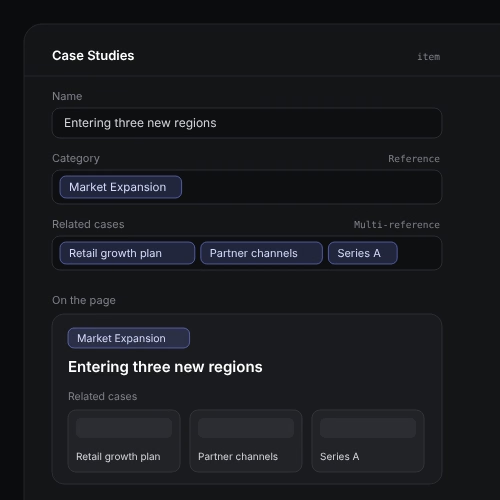
Use a Reference field when an item belongs to one other item, such as a blog post that belongs to one category or one author. Use Multi-reference when an item can connect to several items, such as related posts or several services.
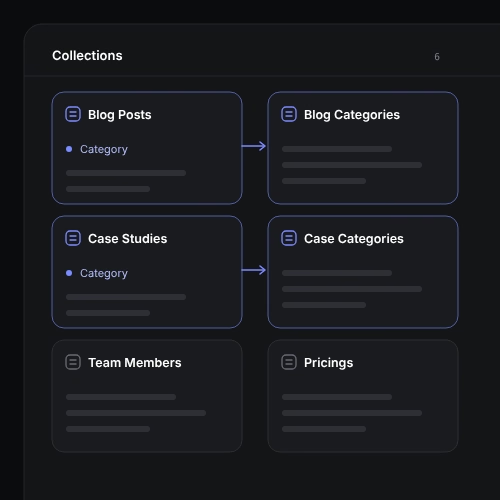
This is how my Consilis template works. It has six Collections: Pricings, Blog Posts, Blog Categories, Team Members, Case Studies, and Case Categories. Posts connect to categories, and case studies connect to case categories, so you can filter content and show related items automatically.
Reference fields also keep content consistent. You edit a category name once, and it updates everywhere it is used.
If the same value appears in many items, it’s usually better as a reference than as typed text.
How do dynamic pages work, and can clients edit content easily?
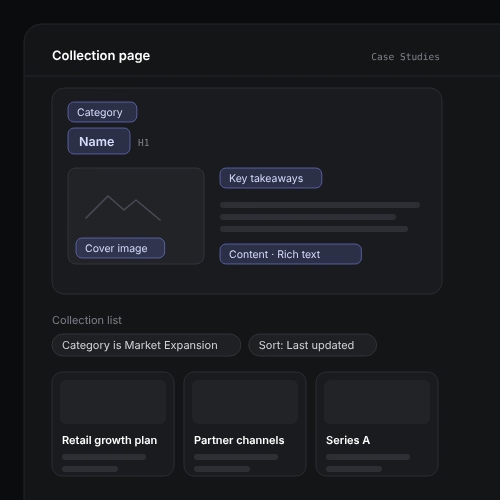
Each Collection has a Collection page, which is a single template for every item. You design it once, connect elements to fields, and Webflow generates a page for each item.
To show items elsewhere, use a Collection list and filter or sort it. For example, you can show the latest three posts on the homepage or only the cases from one category.
Editing is simple when the structure is clean. Clients can update content in the CMS or the Editor without touching the design. I also build repeated blocks as Components with properties, so text and links can be changed from the properties panel without opening the Component.
A good CMS lets the client change the content without being able to break the layout.
Can I extend or customize a CMS template after purchase?
Yes. Webflow CMS is built to grow, and my templates are structured so you can add fields, new Collections, and new dynamic pages without rebuilding the design.
Through my customization service, I can:
- Add new fields to existing Collections
- Create new Collections, such as services, practice areas, or events
- Connect new fields to Collection pages and lists
- Clean up and restructure a CMS from a template made by another author
For example, in a hockey federation project, I created separate Collections for upcoming matches, results, and teams.
A template is a starting point. The CMS structure should match your content, not the other way around.
What are the most common Webflow CMS mistakes?
These are the problems I see most often when I audit existing projects:
- Vague field names like “Text 1” that nobody understands later
- Everything in one Rich Text field instead of separate fields for facts, images, and data
- Typed text instead of References for categories, authors, or related items
- Too many Collections, or Collections nobody uses
- Dynamic pages designed for one perfect item, so longer titles or missing images break the layout
- Missing fields that content will need later, which forces a restructure after launch
Most of these are easy to avoid with a short planning step. If your CMS already has these problems, I can review the structure and propose a cleaner version in a technical audit.
Test your template pages with the longest and the shortest content before you publish.