Webflow SEO & AI

Webflow SEO and AI Guides
Webflow SEO & AI Optimization: Common Questions

What should I set up first for SEO in a Webflow project?
Start with the basics that every page needs, before thinking about advanced tactics:
- A unique SEO title and meta description for each page
- One clear main heading (H1) and a logical H2–H6 structure
- ALT text for meaningful images, and compressed images (I use AVIF where appropriate)
- Clean, readable URL slugs
- Open Graph images for social sharing
- A working sitemap, correct redirects, and indexing settings (including disabling indexing of the staging webflow.io domain)
Also check animations. Effects that split headings into single letters can create unnecessary HTML elements and complicate the heading structure. I explain a real example of this in my template customization case study.
Strong SEO usually comes from getting the basics consistent across every page.
How do I set unique titles and meta descriptions for CMS pages?
Create dedicated fields in the Collection: SEO Title, SEO Description, and H1. Then connect them to the Collection page’s SEO settings.
Without this step, every item in a Blog or Case Studies Collection can end up with the same generic metadata. With it, each item gets its own title, description, and heading, written for that specific page.
I recommend also adding an ALT text field for the cover image, so dynamic pages don’t rely on a generic image description. Every Kedd Design CMS template is built with this structure, and you can read more about how it works in the template SEO FAQ.
If every CMS page has its own title and description, search engines can understand each page separately.
Can I add structured data (Schema.org) to a Webflow website?
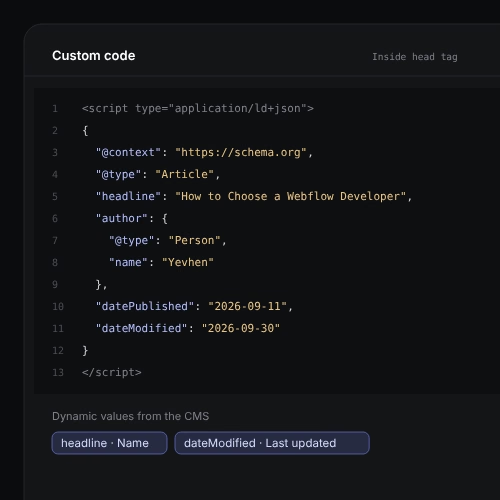
Yes. You can add JSON-LD through custom code on a page, or through an Embed element, and you can use CMS fields to fill dynamic values on Collection pages.
Use types that match the page:
- Organization or Person for the brand or author
- Article for blog posts and case studies
- Product for templates or products
- BreadcrumbList for navigation paths
Two rules matter. The markup must describe what is actually visible on the page, and it should be tested with Google’s Rich Results Test. Structured data helps search engines understand your content, but it does not guarantee rich results or higher rankings. Google no longer shows FAQ rich results, so I add FAQ sections mainly for people and for AI systems.
Structured data is a clear label on your content. It doesn’t replace good content.
What is AI search optimization, and how is it different from SEO?
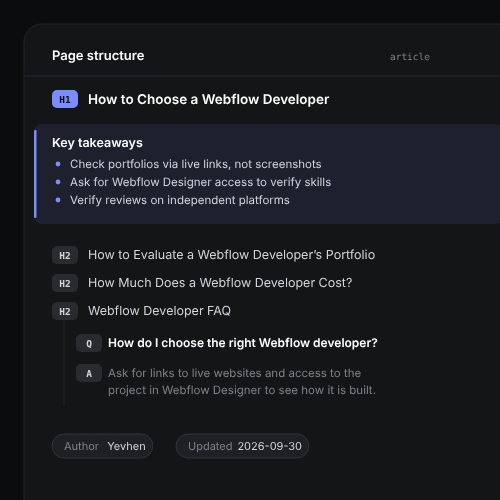
AI search optimization means making your website easy for AI assistants and AI search features to read, understand, and reference. It builds on SEO rather than replacing it.
In practice, I focus on:
- Clear structure: descriptive headings and short, direct answers
- Key Takeaways at the top of long articles
- FAQ sections with real answers, not marketing text
- Visible author information and “last updated” dates
- Consistent names, services, and facts across pages
- Important content in the HTML, not hidden behind clicks or scripts
Nobody can guarantee that ChatGPT, Gemini, or Claude will mention a website. What you can do is remove obstacles and make the information easy to understand.
If a person can scan the page and find the answer in seconds, machines usually can too.
Do I need an llms.txt file for my Webflow website?
It’s optional. An llms.txt file is a plain-text summary of your site, listing your main pages and services in a format that is easy for AI tools to read. I use one on kedd.design and add it in some customization projects.
I treat it as a low-effort extra, not a core SEO task. A missing llms.txt is not an SEO error, and I wouldn’t expect it to change your rankings or guarantee citations. Spend your time first on clear page content, good headings, structured FAQ sections, and correct metadata.
llms.txt is a helpful summary. The pages themselves still do the real work.
How do I check that my Webflow site is indexed and track SEO results?
Set up Google Search Console and verify your domain. Then:
- Submit your sitemap
- Check the Pages report to see which URLs are indexed and why others are not
- Use URL Inspection to request indexing for new or updated pages
- Watch the Performance report: impressions, clicks, average position, and the queries and pages behind them
Search Console also has a report for impressions in Google’s generative AI features. It shows impressions only, without clicks, but it is a useful early signal.
Give changes time to work. A new or updated page is not ranked immediately, so compare the same queries and pages over several weeks, not days.
Track the same pages and queries over time. One day of data tells you very little.