
Built for modern Webflow creators

How to Choose a Webflow Developer

Learn how to choose a Webflow developer by evaluating their portfolio, technical skills, Webflow experience, pricing, process, and client reviews.
8
min read
How to Choose a Webflow Developer

Key Takeaways

  • Check portfolios via live links, not screenshots. Ask which part of each project (design or development) the person actually worked on.
  • Ask for Webflow Designer access to verify technical skill. Look at 5 things: methodology (e.g. Client-First 2.1), page/section structure, basic SEO (titles, meta, ALT text), responsive behavior, and load speed.
  • CMS setup reveals real expertise. Clean Collection field names, semantic HTML5, per-page meta data, and optimized images signal a professional build.
  • Use of Webflow Variables (color, spacing, typography) indicates a scalable, systematic design approach.
  • Slow communication early on is a red flag for how the project timeline will go.
  • Verify reviews independently — Clutch for agencies, Upwork for freelancers. Refusal to provide references is a warning sign.
  • Freelancer vs. Agency is a trade-off, not a hierarchy. Agencies cost more but offer team oversight and delivery guarantees; freelancers are cheaper but slower and more dependent on one person.
  • Certified Partner status builds trust but isn't sufficient on its own - still review portfolio, skills, and communication.
  • Typical pricing: freelancers ~$1,000–$5,000, agencies ~$5,000–$15,000+, depending on pages, CMS, and functionality.
  • Content is structured for AI-search discoverability (ChatGPT, Gemini, Claude referenced directly) - a useful reference point if you're optimizing your own Marketplace case studies for AEO, not just SEO.

How to Choose a Webflow Developer

If you need to build a website and don't know how to choose a Webflow developer, I hope this guide will help you answer the most important questions and make the right choice when looking for a reliable and professional Webflow agency or freelancer.

The right choice is not always about price, although cost is one of the most important factors for many clients. If you choose a Webflow developer based only on price, you may regret this decision later and end up paying much more or even having to rebuild your Webflow website from scratch.

What to Look for in a Webflow Developer

Before choosing a Webflow agency or Webflow developer, you should consider several important factors that can help you make the right decision, whether you choose a full development team or an experienced freelancer.

Webflow experience

Carefully check how long the developer has been working with Webflow and how many projects they have completed. If their portfolio contains only one or two finished projects, they may be a developer who is just starting their career.

This does not automatically mean you should reject them. They could still be a very skilled Webflow freelancer or agency. However, if you are looking for someone with a strong background and extensive Webflow development experience, this is an important factor to consider.

Portfolio of real websites

Pay close attention to the developer's portfolio. An experienced Webflow developer who has been working with Webflow for a long time should have several real projects to show.

These should not only be mockups or screenshots. Look for complete websites that were actually developed by the agency or freelancer. Ask for direct links to live websites that you can open and review yourself.

Do not focus only on the design. In many cases, a Webflow developer may have been responsible only for the website development and may not have been involved in the original design. This is also important to understand when evaluating their portfolio.

Technical knowledge

Ask the developer to provide access to the website through Webflow Designer so you can see their technical skills and development approach. This can give you much more information than simply looking at a finished website.

Here is a basic five-step checklist to review in Webflow Designer:

  • Development methodology — for example, Client-First 2.1 or another structured approach.
  • Page structure — each section should be organized clearly and logically.
  • Basic SEO settings — check meta titles and descriptions, image optimization, and ALT text. Sometimes animations are prioritized over proper page structure, which can make SEO optimization more difficult. I described a similar example in this case study.
  • Responsive design — check how much attention the developer gives to tablets and mobile devices.
  • Page loading speed — check whether the website is optimized for good performance.

Even this basic five-step checklist can help you understand how the developer works and how they approach Webflow website development.

Communication and project process

Pay special attention to communication and how quickly the developer responds to your messages.

If you ask about the development process, project progress, or the current stage of the work and the developer does not respond for several hours, this can be a warning sign that communication and the project timeline may become difficult.

A professional developer should maintain clear communication and keep you informed about the current stage of the project. You should always know what is being worked on and what the next steps are.

Reviews and client experience

A strong advantage for a Webflow freelancer is having reviews from previous clients. Reviews may be available on the developer's own website if they have one. You can also check agency reviews on platforms such as Clutch. If you are working with a freelancer, you can ask for links to their profiles on freelance platforms such as Upwork.

Reviews from independent platforms can provide additional information about the developer's communication, reliability, and previous client experience.

If a developer is not willing to provide any way to verify their previous client experience, this can be a warning sign that you should consider carefully.

How to Evaluate a Webflow Developer's Portfolio

Let's move to one of the most important questions: how to properly evaluate a Webflow developer's portfolio and what you should look for.

As mentioned above, a Webflow developer's portfolio should contain live projects with direct links to finished websites. If you can only see screenshots or graphic mockups, ask the developer for live examples before making a decision.

Every agency or freelancer should be able to show real projects they have worked on. However, keep in mind that a developer may have worked on a website several months or even years ago.

After the original project was completed, the website owner may have made changes themselves or hired another developer. For this reason, review several projects and ask the developer which parts of each website they personally developed and which projects they worked on most recently.

Look for live Webflow websites

Open the links to live websites in the developer's portfolio. This allows you to review the design, animations, interactions, and other elements that may require your attention.

Remember that the developer may have been responsible only for the Webflow development, while the website design was created by another designer or provided by the client.

In this case, ask the freelancer or agency which part of the project they were responsible for.

Examples of completed projects should be publicly available whenever possible. You can see examples of Webflow development projects on this page.

Check responsive design

Ask for access to the Webflow Designer for portfolio projects where possible. This allows you to see how much attention the developer paid to responsive design across large screens, tablets, and mobile devices.

High-quality responsive design and correct content display across different devices are important parts of professional Webflow development. They can also affect the overall user experience, accessibility, and technical quality of a website.

Look for CMS-driven websites

Pay attention to how the developer created Webflow CMS Collections for dynamic content, which fields were created, and how those fields were named.

Check how dynamic pages are structured and how easily the content can be managed and displayed.

Things to look for include:

  • Dynamic CMS structure
  • Semantic HTML5 markup used for blogs, case studies, or other content
  • Separate meta titles and descriptions for individual CMS pages
  • Optimized image dimensions and file sizes
  • Clear and meaningful field names in CMS Collections

Variables

Check whether the developer uses Webflow Variables to make global design changes easier.

If a developer uses Variables as part of their workflow, this can be a major advantage. It allows you to make design changes more efficiently and customize multiple parts of a website from a centralized system.

A professional Webflow agency or freelancer can use Variables for:

  • Colors
  • Spacing, including margin and padding
  • Gaps
  • Typography, including font size, text color, line height, and letter spacing

Check whether the developer explains their role

If you hire a Webflow agency, ask who will be responsible for the design, development, and other parts of the website project.

Each person should have a clearly defined role. Also ask whether the agency handles the Webflow development internally or works with external freelancers.

There is nothing wrong with an agency working with independent freelancers or contractors. However, you should clearly agree on responsibilities and project deadlines before starting the work.

If you hire an independent Webflow freelancer who works alone, have a detailed consultation and ask questions that will help you understand how they work, what they will do at each stage, and how much time the project is expected to take.

Ask the freelancer questions such as:

  • How long will the complete website take to build?
  • How often will the freelancer be available for communication?
  • Will they provide updates at each stage of the project?
  • Can you request changes during the development process?
  • Is an upfront payment required?
  • Can the payment be divided between different project stages?
  • Is it possible to work through a freelance platform to help protect the payment?

These seven questions can help you understand whether the freelancer is a good fit for your project or whether you should consider other candidates.

Category Freelancer Agency
Cost Lower cost Higher cost
Timeline Usually takes more time Usually takes less time
Communication Always in direct contact Always in contact
Skill Coverage Needs to handle every skill alone Each team member handles their own specialty
Quality Control Depends on self-discipline, less oversight More quality control at every stage
Team Structure Works alone Works as a team
Portfolio Required Required
Professionalism Varies from person to person Generally consistent across the team
Project Continuity Risk of the project being interrupted Guarantee of project completion
Contract Not always in place Work can be contract-based
Payment Security Usually held in escrow on a freelance platform Paid to the company's official bank details

Webflow Partners and the Webflow Partner Directory

If an agency or freelancer is a Webflow Certified Partner and is listed in the official Webflow Partner Directory, this can be a positive factor when choosing a developer.

You can browse the official Webflow Partner Directory.
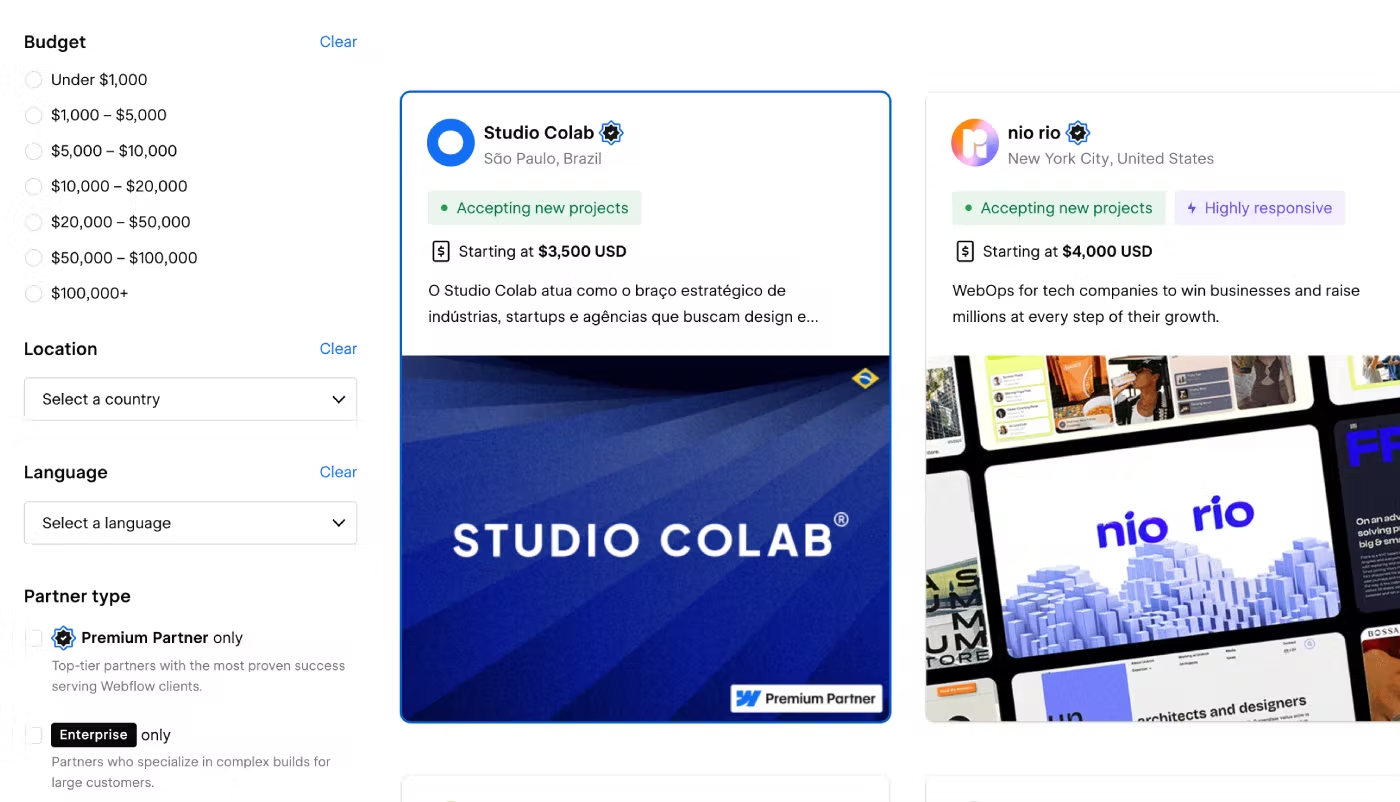
Webflow Certified Partners Directory with search and filters for finding Webflow developers, freelancers, and agencies.
Webflow Certified Partners Directory showing the main search and filtering interface for finding Webflow agencies and freelancers.

The directory allows you to filter Webflow professionals by several characteristics:

  • Project budget — Under $1,000, $1,000–$5,000, $5,000–$10,000, $10,000–$20,000, $20,000–$50,000, $50,000–$100,000, and $100,000+.
  • Location — choose a developer or agency based on their location if this is important for your project.
  • Language — select the language you prefer to use for communication.
  • Business type — choose whether you want to work with an agency or an individual freelancer.
  • Services offered — select the services you need from your Webflow developer.

Using the right filters can help you narrow down Webflow developers and agencies based on your requirements, budget, location, and services.

However, you should not rely only on the Webflow Partner Directory. You can find skilled and experienced Webflow developers who are not listed there.

A Webflow Certified Partner status can be a useful trust signal, but it does not automatically guarantee the quality of the work, the right price, or the project timeline. You should still review the developer's portfolio, technical skills, communication, and previous client experience.

How Much Does a Webflow Developer Cost?

The cost of Webflow development can vary significantly depending on who you work with — a Webflow agency or a freelancer.

If you work with an agency, a website development project may cost around $3,000–$15,000 or more. The final price depends on the number of pages, required functionality, project complexity, Webflow CMS Collections, animations, integrations, and other project requirements.

An agency has costs related to the team working on your project, software, workspace, and other business expenses. These costs are usually reflected in the final development price.

If you work with a freelancer, a new Webflow website may cost around $1,000–$3,000–$5,000 or more, depending on the scope of the project. The final price depends on the number of pages, CMS setup, integrations, animations, custom functionality, and other requirements.

One potential disadvantage of working with a single freelancer is the project timeline. One person may work more slowly than a full team, especially when several tasks need to be completed at the same time.

A freelancer may also work on several projects simultaneously, which can affect the development schedule.

For this reason, discuss all project conditions before starting the work. If necessary, use a freelance platform with payment protection or sign a contract. These steps can help protect both sides and create clearer expectations for the project.

If you need Webflow customization services and want to learn more about the cost of this type of work, you can find detailed information here.

Final Results

If you have the budget for a professional website and want to work with a team that can handle the project from start to finish, a Webflow agency may be the right choice.

If you want to reduce development costs, are comfortable with a potentially longer timeline, and prefer to work directly with one person, a Webflow freelancer may be a better option.

In both cases, always check the portfolio with live website links, review several projects through Webflow Designer, and discuss all project requirements, responsibilities, communication, payment terms, and deadlines before starting the work.


What to check when evaluating a Webflow developer, and why it matters

Category What to Check Why It Matters
Webflow Experience Years working with Webflow, number of completed projects Signals depth of expertise vs. someone just starting out
Portfolio Live website links, not screenshots or mockups Confirms real, working builds you can inspect yourself
Technical Knowledge Access to Webflow Designer: methodology, structure, SEO, responsiveness, speed Reveals actual build quality behind the finished design
CMS Architecture Collection field names, dynamic page structure, semantic markup Determines how manageable and scalable the site will be
Variables Usage Use of Webflow Variables for color, spacing, typography Indicates a systematic, scalable design workflow
Communication Response time and clarity on project progress Predicts how smooth the working relationship will be
Reviews Clutch, Upwork, or references from past clients Provides independent proof of reliability
Certified Partner Status Listing in the official Webflow Partner Directory A trust signal, but not a substitute for due diligence
Pricing $1,000–$5,000 (freelancer) vs. $5,000–$15,000+ (agency) Helps set realistic budget expectations
Role Clarity Who handles design vs. development vs. SEO Avoids gaps or overlaps in responsibility

About the Author:
Webflow Designer & Developer specializing in premium Webflow templates, scalable CMS architecture, Client-First development, SEO, and AI-ready websites. Every guide is based on real project experience and follows Webflow Marketplace best practices.
Last Updated:
2026-09-15
Best For:
Webflow Developers, Freelancers, Digital Agencies, Creative Agencies, Website Owners, Marketing Teams

Explore More Webflow Case Studies

No items found.

Webflow Developer FAQ

Find clear answers to the most common questions about choosing a Webflow developer, evaluating their experience and portfolio, comparing freelancers and agencies, and understanding the Webflow development process.

FAQ KEDD Webflow Template

How do I choose the right Webflow developer for my project?

Choosing a Webflow agency or freelancer can take some time, but it is important to approach this decision carefully to avoid problems in the future.

To choose the right Webflow developer who can complete the project properly, pay attention to several important factors:

  • Ask for links to live websites that were recently developed. This will help you see the developer's most recent work.
  • Ask for access to the websites through Webflow Designer so you can check which development methodology the developer uses. This could be Client-First 2.1 or another methodology.
  • Discuss the project timeline and, if necessary, agree on deadlines for each stage of development, including design, Webflow development, animations, and CMS Collections.
  • Discuss the possibility of signing a contract.
  • If you are working with a freelancer, ask whether you can use a freelance platform with payment protection.
  • Ask for reviews from recent clients. These can be found on freelance platforms, Clutch, or other independent services.

What should I look for in a Webflow developer's portfolio?

When reviewing a Webflow developer's portfolio, ask for access to Webflow Designer when possible. This allows you to see and analyze how the website was actually built.

Pay attention to:

  • Development methodology
  • Page structure
  • Correct heading hierarchy
  • CMS Collection field names
  • Dynamic pages and content structure
  • Responsive design for large screens, tablets, and mobile devices
  • Basic SEO optimization
  • Meta title and meta description settings
  • Image optimization and ALT text
  • Page loading speed
This information should be enough to understand how the freelancer works and how professionally they approach Webflow website development.

How can I check a Webflow developer's technical skills?

To check the technical skills of a Webflow developer, ask them several questions about their development process and technical approach.

  1. How do you organize the class structure, which naming system do you use, and how do you organize sections on each page?
  2. Which breakpoints do you use when adapting a website layout for different screen sizes?
  3. How do you build a Webflow CMS architecture, and how do you name your CMS fields?
  4. Do you pay attention to page loading speed and website performance?
  5. Do you use third-party animation libraries from the beginning, or do you first work with Webflow's native animation features?
  6. Do you pay attention to SEO settings during the development process?
These questions can help you understand how well the developer understands Webflow, how they approach the development process, and what technical skills they have.

What makes a good Webflow website structure?

A high-quality Webflow website structure should be professional, easy to manage, and ready for future development and scaling. It should follow several important principles:

  • Systematic development methodology: Use a framework or methodology for organizing styles, such as Client-First by Finsweet. This approach helps create a clean class hierarchy and reduces unnecessary duplicate classes.
  • Logical CMS architecture: Each CMS Collection should have separate fields with clear and meaningful names. The client should be able to understand what each field is used for, edit the content, and scale the CMS structure in the future.
  • Flexible responsive design: All layouts should display correctly across different devices. On mobile devices, content should be optimized and presented in a clear and compact way while maintaining comfortable text sizes and usability.
  • SEO and AI search optimization: Each page should have a clear heading hierarchy (H1–H6), semantic HTML5 elements, fast loading performance, and a structure that is ready for Schema.org and JSON-LD structured data. The content should also be organized clearly so that AI search systems and AI agents such as ChatGPT, Gemini, and Claude can better understand and reference important information.

Should I hire a Webflow freelancer or a Webflow agency?

If you are deciding whether to work with a Webflow freelancer or Webflow agency, consider the following recommendations:

  • Cost: Working with a freelancer can be less expensive than working with an agency. A complete website development project with a freelancer may cost around $1,000–$5,000. An agency may charge around $5,000–$15,000 or more, depending on the project.
  • Development time: One person may take significantly longer to complete a project than a team of professional designers and developers.
  • Service agreement: Working with an agency may make it easier to sign a formal contract. If you work with a freelancer, you can also use a freelance platform that provides additional payment protection, although it may charge a service fee.

You can also reduce the risks and manage the project more efficiently by dividing the work into several stages and working with different specialists. For example, you can hire one freelancer for the website design, another freelancer for Webflow development, and another specialist for SEO optimization.

This approach allows you to control each stage separately, reduce costs, and have more flexibility when managing the project.

What is a Webflow Certified Partner, and does it matter when choosing a developer?

If a freelancer or agency has Webflow Certified Partner status and is listed in the Webflow Partner Directory, this can increase your confidence when choosing a professional Webflow developer.

It can be a positive signal that the developer has experience working with Webflow and has passed Webflow's requirements for the Certified Partner program.

A Certified Partner has gone through Webflow's partner approval process and has demonstrated their Webflow experience through their work.

This can give you more confidence when choosing a Webflow developer, but it should not be the only factor you consider. You should still review the developer's portfolio, technical skills, communication, previous client experience, and project process.

How much does it cost to hire a Webflow developer?

The cost of building a Webflow website depends on the amount of work, required functionality, number of pages, CMS requirements, and other project requirements.

As a general guide, you can consider the following ranges:

  • $1,000–$5,000 — a complete website with around 4–6 pages.
  • $5,000–$7,000 — a complete website with around 6–10 pages and Webflow CMS Collections for dynamic content.
  • $7,000–$15,000 — a professional website with more advanced functionality, CMS Collections, and ongoing support after the project is completed.
The final price can vary depending on the complexity and requirements of each Webflow development project.

What questions should I ask a Webflow developer before hiring them?

Before starting the project, ask the developer these questions to understand their technical knowledge and development process:

  • What principles do you follow when organizing the class system, choosing class names, and building page sections?
  • Which breakpoints do you usually use for responsive website design?
  • How do you design the CMS database structure, and what naming system do you use for CMS fields?
  • Do you optimize websites to improve page loading speed and performance?
  • Do you start with Webflow's native animation tools, or do you immediately use third-party animation libraries?
  • Do you include basic SEO optimization in your Webflow development process?
  • Do you prepare the website structure for AI search and AI agents and make important content easier for search engines and AI systems to understand and reference?
  • Do you provide full-cycle website development, including the design system, layouts for all pages, and Webflow development, or do you focus only on Webflow development?

What are the main red flags when choosing a Webflow developer?

Ask direct questions and expect clear answers. If a developer gives vague answers, unclear deadlines, or cannot clearly explain how the project will be completed, this can be a warning sign.

Here are some important questions to ask:

  • How much time will the entire project take?
  • Which content will I be able to edit myself after the website is completed, both on static and dynamic pages?
  • Are all CMS Collection fields structured according to the content requirements?
  • Can you show examples of your most recent Webflow projects with live links to real websites?
  • Can you provide reviews from recent clients on freelance platforms or independent services?
  • Will you be able to help with website settings after the development is completed?
  • Do you offer a free consultation before starting the project?

Is a Webflow designer the same as a Webflow developer?

A Webflow designer usually focuses more on the visual side of a website. They may create layouts in Figma, work with typography, and design how content should be displayed across different breakpoints.

A Webflow developer focuses more on the technical implementation of the website, including complex CMS architecture, third-party integrations, custom JavaScript and CSS, performance optimization, and SEO settings.

However, these roles can also be combined into one person. An experienced professional can create the design layouts for all pages, build the website in Webflow, configure CMS Collections, implement SEO settings, and improve page loading performance.